
One camp says optimize for AI now, the other says AI referral traffic is a rounding error and you should switch it off. Your own order data can settle it. Judge AI orders like any other channel: put them next to the rest in a 5-number AI order scorecard - average order value, share of new customers, refunds, gross margin per order and repeat purchases.
Key point: Judge AI channels by the trend over several months. A single month tells you little; Step 5 shows what to do when AI orders grow, hold steady or fall.

Step 1: Find Every AI Channel Order in Shopify
AI referral traffic is the visits that reach your store from a link inside an AI assistant such as ChatGPT, Gemini, Copilot, Perplexity or Claude. To see ChatGPT traffic and the orders from other AI channels, look in two places: the Agentic page for a channel summary and the source fields on each order. Some AI channels also let shoppers check out right in the chat, and those orders belong in the same count.
The Shopify details below follow Shopify's Help Center on agentic storefronts, checked on November 19, 2026. AI channels change often, so re-check before you rely on them.
The Agentic page: AI channel traffic and sales at a glance
Under Sales channels > Agentic, the Agentic page lets you switch between Sales, Orders, Online store sessions and Online store conversion for each AI channel, for the last 30 days by default. Sales there combines visits from AI links and purchases made inside the AI channel. Sessions and conversion are your AI referral traffic: how many visits each AI channel sends and how many of them turn into orders. Use the page for a quick check; the five numbers below need order-level data.
On each order: sales channel, referring site and UTM source (like utm_source=chatgpt.com)
Orders from AI links. Shoppers who buy from ChatGPT complete their purchase through your online store checkout, in ChatGPT's in-app browser or a new tab (Help Center). The ChatGPT channel is available to stores that sell to customers in the United States. On orders like these, the AI source usually shows up in the referring site or UTM source, for example utm_source=chatgpt.com: that is how ChatGPT referral traffic shows up on an order. Links from other AI services often carry the service's name the same way. It's the same UTM source you may already use for tracking campaign ROI.
Orders from agentic storefronts. Shopify lists ChatGPT, Google AI Mode and Gemini, Microsoft Copilot and Meta as agentic channels, with orders appearing "with channel or referrer attribution". Open one of these orders to see how it's labeled in your store.
One rule for your AI orders segment
Count an order as an AI order if any of these is true:
- its sales channel is one of the AI channels on the Agentic page;
- its referring site contains an AI service name;
- its UTM source contains an AI service name.
Names to match: chatgpt (with or without .com), claude, gemini, copilot, perplexity, meta. Add new ones when they show up in your orders. This list is how you track AI traffic in Shopify without GA4; if you also use GA4, it works there as a custom channel group.
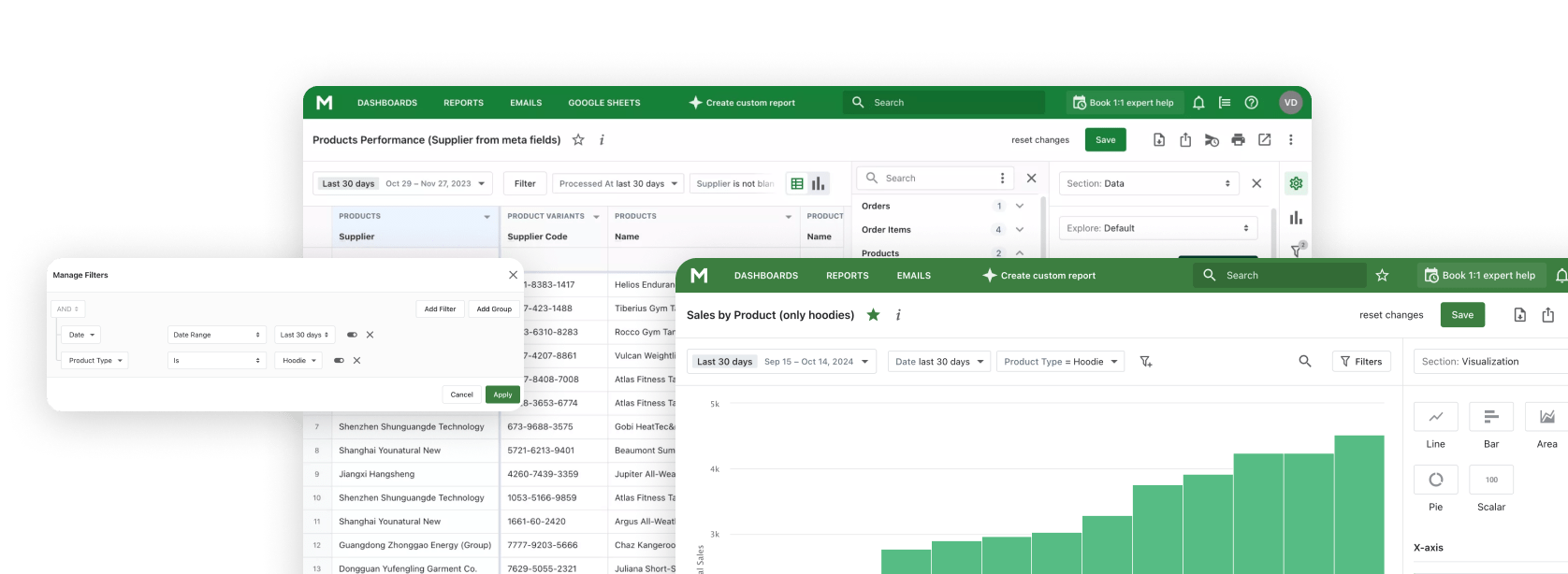
In Mipler: open the built-in Sales by UTM Source report and filter UTM Source to the AI service names, so each AI service gets its own row. Add Referring Site and Source Name (the sales channel) as well, so orders from links without UTM tags and checkouts inside AI channels also land in the segment.
Step 2: Count AI Orders as a Floor, Because Some Show Up as Direct
Your AI order count is a minimum: some orders that started in an AI chat land as Direct or Google. Three ways this happens:
- Copied link. The shopper pastes your URL from the chat into a browser, and the visit is recorded as Direct.
- In-app browser. Visits from an app's built-in browser can arrive without a referring site.
- Later brand search. The shopper sees your store in an AI answer and searches for your brand on Google the next day.
So report the AI segment as "at least N orders", and keep orders with no referrer and no UTM source as "unknown" rather than "not AI". If you already ask "How did you hear about us?" at checkout, compare those answers with the segment every so often.
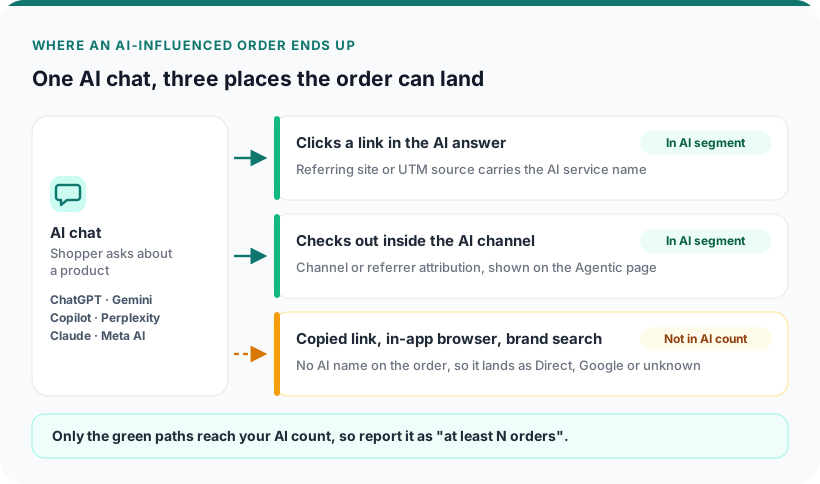
Link clicks and in-chat checkouts reach your AI count; copied links, in-app browsers and brand searches don't, so the number is a floor.
Step 3: Compare AI Orders With Your Other Channels on 5 Numbers
AI orders are worth your time if they hold up against your other channels on five numbers: average order value, share of new customers, refunds, gross margin per order and repeat purchases. Comparing conversion rates, for example ChatGPT traffic vs Google, shows whether AI visitors buy, not whether those orders pay off.
Build one 5-number AI order scorecard. Rows: AI orders (all AI channels pooled) and two or three comparison groups, such as Google organic, paid ads and email. Columns: the five numbers below. Use the same dates for every row: the last 90 days, or 180 if you have only a few AI orders. The sales by channel report gives you the revenue side to start from.
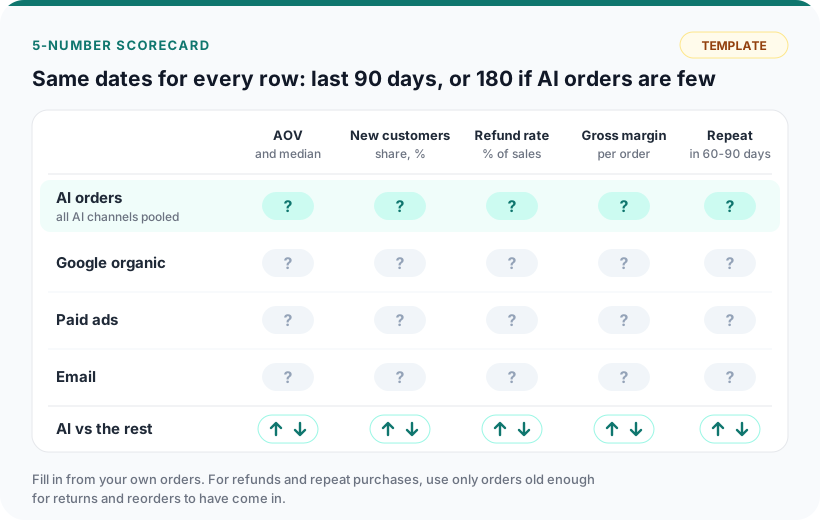
Template: fill each cell from your own orders, then mark AI higher or lower than the rest.
| Number | What it tells you | How to calculate it |
|---|---|---|
| Average order value | Whether AI shoppers spend more or less per order | Net sales / orders, plus the median order value |
| Share of new customers | Whether AI brings people who never bought from you | First-time customer orders / all orders |
| Refund rate | Whether AI orders come back more often | Refunded amount / sales, on orders older than your return window |
| Gross margin per order | What each order earns after product cost | (Net sales - cost of goods - shipping cost) / orders |
| Repeat purchases | Whether AI customers buy again | First-time AI buyers who order again within 60-90 days / all first-time AI buyers |
In Mipler: add the Cost and Customer Type columns to the Sales by UTM Source report, so refunds, margin and new vs returning sit in one table next to each source.
Average order value: do AI shoppers spend more?
Divide sales by orders for each row, and check the median too. In a small segment, one large order can make AI shoppers look like big spenders when most buy one item.
New customers: does AI bring people who never bought before?
A high share of new customers means AI channels reach people who didn't know you. A low share means existing customers come back through an AI answer, and they might have ordered anyway. Compare it with your other channels in a new vs returning customers view.
Refunds: do AI orders get returned more?
Calculate refunds as a percentage of sales for each row, counting only orders older than your return window. High refunds can mean AI shoppers order before reading the product page. A refunds report gives you the amounts.
Gross margin per order: what each AI order earns
Revenue after discounts minus cost of goods, and minus shipping if you track it, per order. Small full-price baskets can earn more than large discounted ones. For this number, each product needs a cost per item filled in.
Repeat purchases: do AI customers come back?
Of the shoppers whose first order came from an AI channel, how many ordered again within 60 to 90 days, through any channel? Run it only on cohorts at least that old, and compare with first-time buyers from your other channels. For a wider view of what brings people back, see which first product brings buyers back.
Step 4: See Which Products AI Shoppers Buy
Check which products AI shoppers buy, because the product mix explains part of every gap in Step 3. If AI shoppers mostly buy your cheapest item, a low AOV says more about that item than about the channel.
Compare the share of units by product type in AI orders with all orders, and list the top 10 products in AI orders. Then check two things: stock, so a product AI keeps selling doesn't run out unnoticed, and product page accuracy, because AI shoppers act on what the page says. Agentic storefronts can only sell products that are eligible for Shopify Catalog, so orders placed inside AI channels come from that part of your catalog.
Step 5: Decide Whether to Keep or Grow Your AI Channels
Grow AI channels when AI orders rise for several months and margin and refunds hold up; keep them running and check monthly when orders are steady. Read the five numbers together with that trend, next to your other channels.
- Grow: AI orders have grown steadily for several months, and margin and refunds hold up. Start with the categories AI already sells. Ask two or three AI services about those products the way a shopper would, and see which stores they suggest next to you and at what price. Make descriptions complete: specs, sizes, materials, shipping, returns and availability. Change prices only where the margin from Step 3 leaves room, or AI will bring you buyers you don't make money on.
- Keep: AI orders are steady and the numbers look like your other channels. Leave it running and check monthly.
- Falling: look for the reason before you decide anything: the products from Step 4, their prices and stock.
If AI grows while another channel slips, shift your focus and ad budget accordingly.
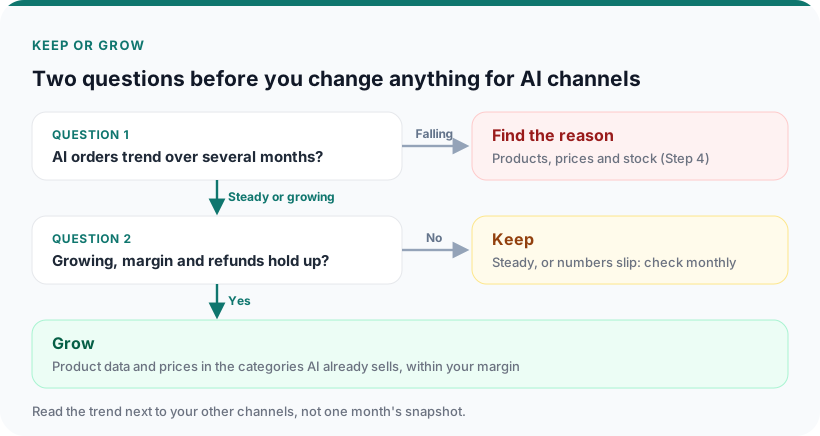
Two questions in order: the trend, then growth with margin.
How many AI orders you need before the numbers mean anything
With a handful of orders, one refund or one large basket swings a whole column. Until AI orders build up, report counts, keep AI channels pooled and use the 180-day window.
Should you turn agentic storefronts off?
Shopify describes agentic storefronts as "active by default for eligible stores". Check your five numbers before you decide. For ChatGPT, the Help Center says there are no fees beyond your standard payment processing fees; for other AI channels, check each channel's page. If you still want them off, the settings are under Sales channels > Agentic. After you turn off Shopify Catalog access, it can take up to 7 days before your product data stops being shared, and products can still be found through web crawling and indexing. Shop also counts as an agentic storefront, and it can't be turned off there.
What your data can't tell you yet
You won't see the prompt a shopper typed before ordering, so no report shows why an AI service suggested your store. Work it out from which products AI sells (Step 4) and where AI shoppers differ from your other buyers (Step 3).
Step 6: Track AI Referral Traffic and AI Orders Every Month
Check AI orders once a month and make decisions once a quarter. On a small channel, week-to-week numbers swing a lot, so checking your Shopify AI traffic every day mostly gives you noise. The monthly check has four lines:
- AI sessions and orders, and their share of the total, next to your other channels.
- The five numbers on a rolling 90 days.
- The top 10 products in AI orders.
- One sentence: what changed and what you'll do about it.
When a new AI service appears in your UTM sources, add it to your segment rule. For the flip side, AI reading your data for you, see AI as your analyst.
In Mipler: a Monthly report with Compare to the previous period does this check for you.
How to Run This Check in Mipler in 10 Minutes
In Mipler, the 5-number AI order scorecard starts from the built-in Sales by UTM Source report.
- Open Sales by UTM Source. It lists orders, taxes, discounts, refunds, total and net amount per UTM source.
- Filter to AI sources. Set UTM Source to contain chatgpt, claude, gemini, copilot, perplexity or meta, and check Referring Site and Source Name for the same names. In a second copy, remove the AI filter and the default "UTM Source is not empty" filter, so AI rows sit next to google, email and the rest, and orders with no UTM source show up as your "unknown" bucket from Step 2.
- Add Cost and Customer Type for gross margin per order and new vs returning.
- Join an order items report with the UTM source report to see which products sell through each source.
- Put the scorecard and product table on one dashboard, next to the store totals.
- Make a Monthly copy with Compare to the previous period, send it with Scheduled Emails on the 1st and add an Alert, so you hear about any change in AI orders between reviews.
- Ask the AI Assistant a follow-up, for example: "Compare orders with UTM source containing chatgpt, gemini or perplexity with google orders by refunds and gross margin per order for the last 90 days."
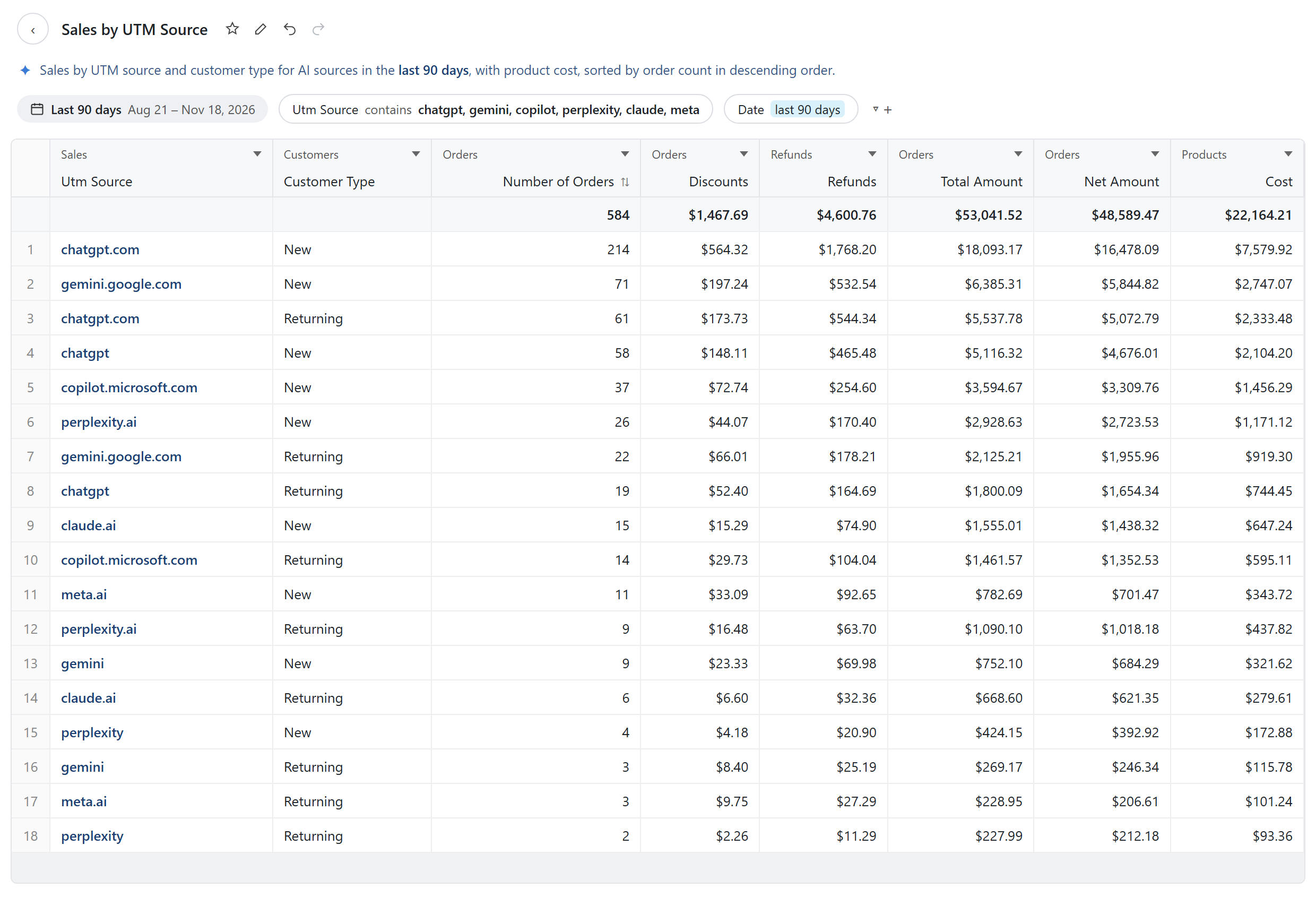
Sales by UTM Source filtered to AI service names, with Customer Type and Cost added. Demo data.
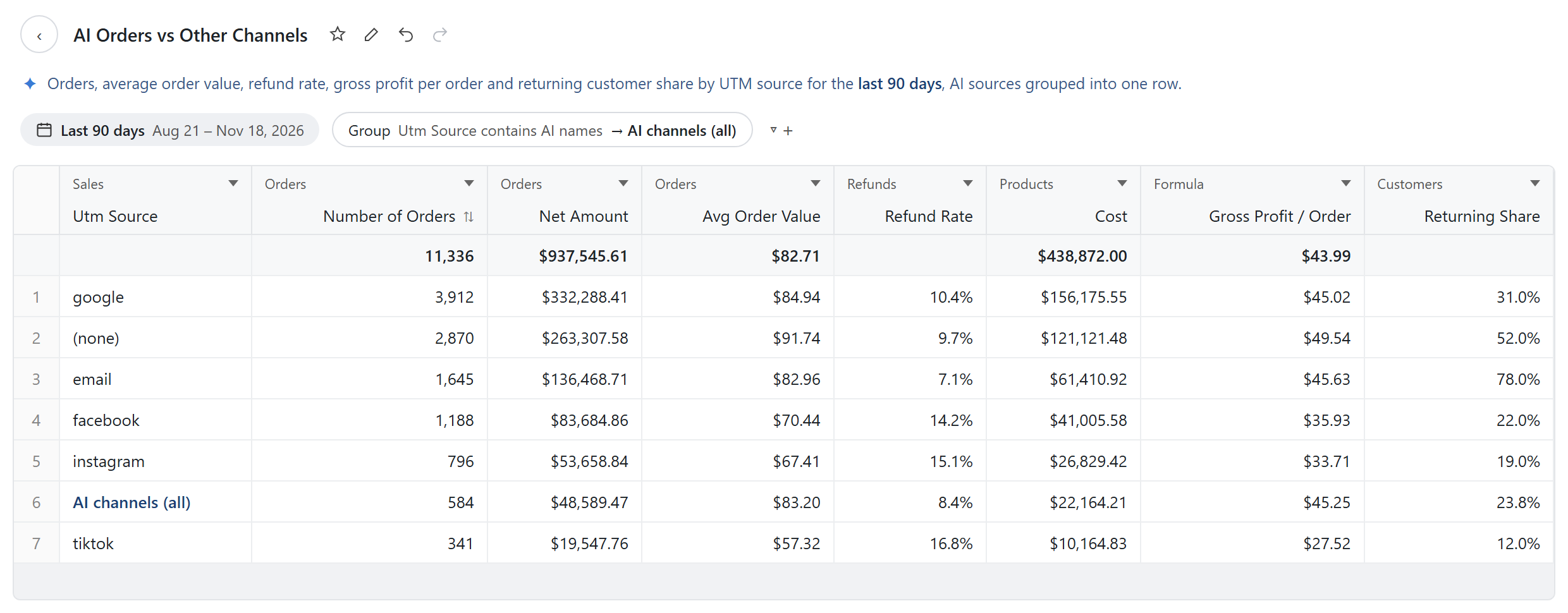
The finished scorecard: AI sources grouped into one row next to your other channels. Demo data.
The repeat-purchase cohort from Step 3, first order from AI and second through any channel, needs a custom report with extra columns. The Mipler team can build it on request.
Saving these reports and sending them with Scheduled Emails is available on the Basic and Pro plans. See pricing and more on Mipler AI analytics.
Explore related reports
Where to Start
This week, write down your segment rule with the AI service names in your UTM sources. Pull the five numbers for the last 90 days next to your two biggest channels, mark the result keep or grow, and put a date three months out in your calendar to check again.
FAQ
What is AI referral traffic?
AI referral traffic is the visits that reach your store from links inside AI assistants such as ChatGPT, Gemini, Copilot, Perplexity and Claude. On Shopify you see it as sessions and orders per AI channel on the Agentic page, and as AI service names in the referring site or UTM source of individual orders.
How do I track AI orders on Shopify?
Filter your orders to those whose sales channel is an AI channel or whose referring site or UTM source contains an AI service name, such as chatgpt, gemini, copilot, perplexity or claude. Then compare that segment with your other channels on average order value, new customers, refunds, gross margin per order and repeat purchases.
Is anyone actually getting orders from AI channels on Shopify?
Yes. Merchants see ChatGPT and other AI services in their UTM sources, and the Agentic page shows sales per AI channel. The share varies a lot by store, and the count you see is a minimum.
What does utm_source=chatgpt.com mean on an order?
The visit that led to the order came from a link in ChatGPT. Other AI services often leave their own name in the UTM source or referring site.
Do purchases made in AI channels show up in my Shopify orders?
Yes. ChatGPT purchases go through your online store checkout and appear in your Orders list. For agentic channels, Shopify says orders appear with channel or referrer attribution.
Should I turn off agentic storefronts?
Compare AI orders with your other channels on the five numbers first. If you have too few AI orders to matter, leaving ChatGPT on usually costs you nothing extra. The settings are under Sales channels > Agentic.
How many AI orders do I need before comparing channels?
While you have only a few AI orders, pool all AI channels into one segment, use a 180-day window and act on the trend over several months rather than on one period's gap.