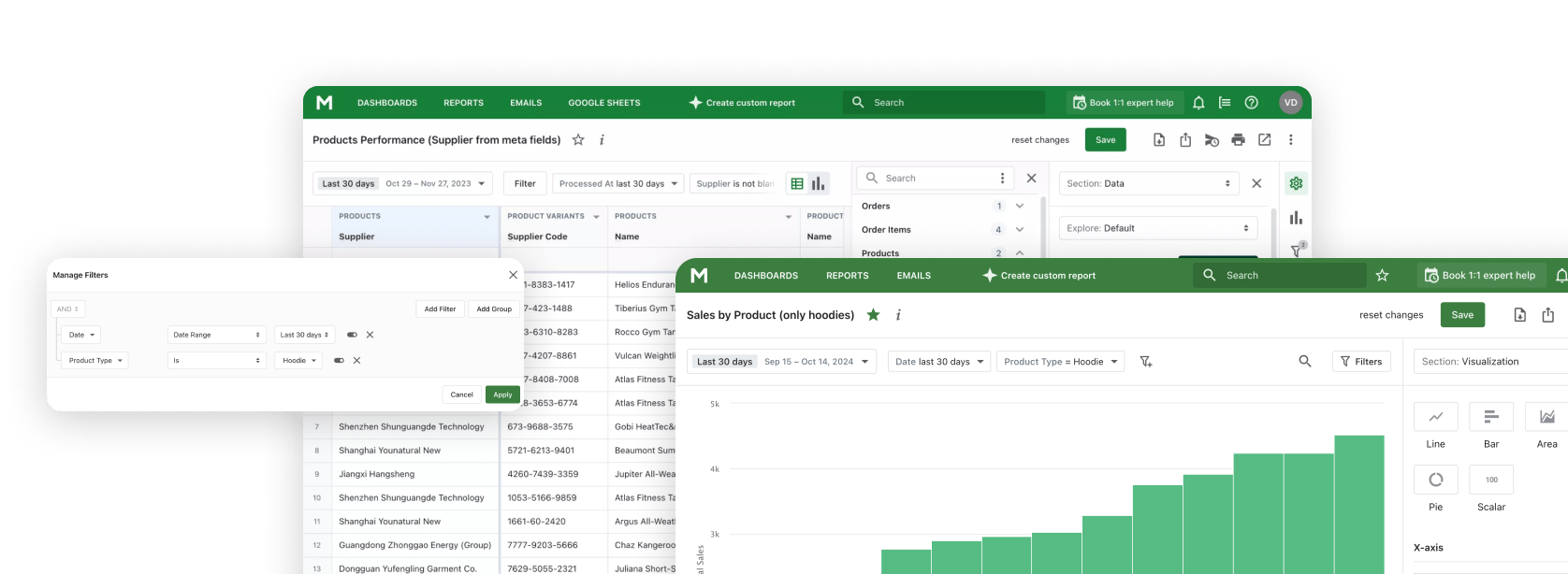


Metafields are what let a Shopify report actually work with your data - calculate it, group it, filter it - instead of just displaying whatever text happens to be attached to a product, order, or customer. That's the real foundation under any custom report worth building: whether the underlying data was structured to support that kind of work in the first place.
After working with merchants on advanced reporting requests, this is the root cause I keep running into when a report doesn't add up: the data was never structured to be analyzed - it's just text, added wherever was fastest at the time. Reports come out inconsistent, filtering runs out of options fast, and someone ends up rebuilding the same numbers by hand every month. (For the wider picture of what Shopify's built-in analytics can and can't do on its own, see our complete guide to Shopify analytics.)

Why Metafields Work Better for Analytics
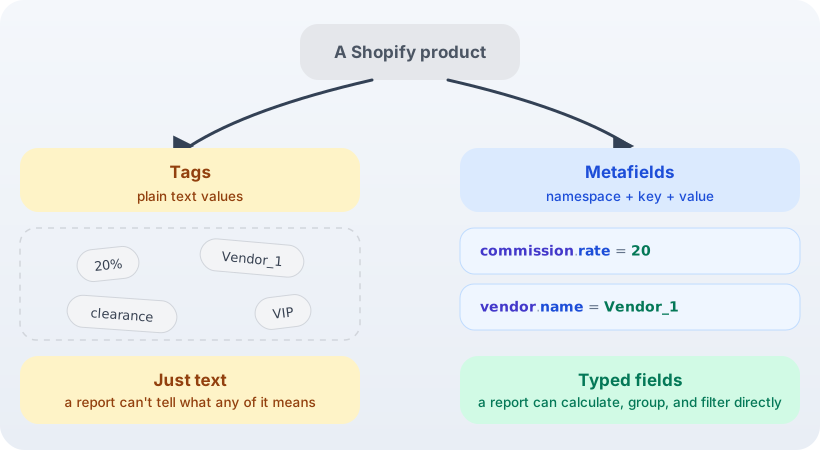
Metafields let you attach structured fields - not just free text - to products, variants, customers,
orders, and most other Shopify resources. Take a commission rate: instead of a tag like
20%, it becomes a defined field:
- Namespace:
commission - Key:
rate - Value:
20
Now "20" is a number the system can use, not text it has to guess about. That's what lets a reporting
tool calculate the commission owed to each sales rep automatically, based on actual sales, instead of
someone exporting a spreadsheet and doing the math by hand. The same fix works for vendor names:
namespace vendor, key name, value Vendor_1 - now a report can group
by vendor directly, instead of guessing which tags happen to be vendor names.
This is exactly the kind of calculation a dedicated Shopify reporting app is built to handle once the underlying field is structured: turning a manual spreadsheet exercise into a report that updates itself. That's the whole point of a custom-report layer over Shopify data - it can only be as reliable as the fields it reads from. (Shopify's own metafields documentation has the full list of resources you can attach them to.)
Where Tags Fall Short
Tags are one of Shopify's most flexible features: easy to create, easy to update, useful for organizing products, customers, and orders. They just weren't built to double as structured reporting data.
A tag is a text value. That's fine for slapping a label on something. It falls apart the moment you need to calculate, aggregate, or filter with any precision.
Take the same commission rate, tagged the way many merchants tag it instead:
10%15%20%
Your staff can read those values fine. Your reporting system can't - not reliably. It has no way to know that "20" is a number you can do math on rather than a string that happens to look like one.
The same problem shows up with data that isn't even numeric. Tag products with vendor names directly -
Vendor_1, Vendor_2, Vendor_3 - and a report has no way to know
those tags mean "vendor" as opposed to anything else you might tag a product with. It can list the
tags. It can't group by vendor.
Side by side, the same product data looks like this:
The Hidden Cost of Unstructured Data
When a store first launches, speed is the priority. Product information, customer attributes, operational details - teams add them wherever it's convenient at the time.
As your store grows, the questions get harder:
- Which products generate the highest commissions for sales representatives?
- How do sales compare across specific product attributes?
- Which customer segments generate the most revenue?
- How does performance vary by custom business metrics?
This is the point where how you stored the data stops being a technical detail and starts deciding whether you get a reliable answer at all. If the information only exists as free-form text or tags, pulling a trustworthy number out of it gets difficult fast - and it stays difficult, no matter how good the reporting tool on top of it is.
The Real Cost Isn't a Wrong Report - It's Manual Rework
When a report built on tags looks wrong, the reporting logic is usually fine. The data structure is the real issue - and it shows up less as a one-off mistake and more as ongoing manual work. A report built to match against a fixed list of tag values - specific vendor names, specific commission tiers - only knows about the values that existed when someone built it. Add a new vendor or a new tier, and the report doesn't pick it up on its own; someone has to notice, then go back and update the formula by hand.
Metafields don't have that problem. A report built to read a vendor or
commission rate field reads whatever value is actually stored there - a new vendor or a new
rate shows up in the next report run, with nothing to update.
If a report looks wrong, don't start by questioning the report. Start by comparing its results against Shopify's own API data for the same period. That comparison tells you whether the mismatch lives in the reporting layer or in the way the underlying information was stored to begin with. Data gets designed for operational convenience first (fast to enter, easy for staff to scan) and analytical consistency second, if at all - and manual formula updates are exactly where that trade-off catches up with you.
A Practical Rule for Adding Any Custom Field
Before you create a tag or a metafield, ask one question: will you ever need to filter, group, summarize, or calculate this information?
If yes, it belongs in a metafield, not a tag. That's the whole rule.
Structured data buys you:
- Consistent formatting
- Reliable filtering and segmentation
- Calculations you can actually trust
- Reports that keep working as your catalog and order volume grow
| Capability | Metafields | Tags |
|---|---|---|
| Can filter by exact value | ✅ | ✅ |
| Supports calculations (treats the value as a number) | ✅ | ❌ |
| Automatically picks up new values, no manual updates | ✅ | ❌ |
| Zero setup - just type it in | ❌ | ✅ |
| Good for quick labels like "clearance" or "VIP" | ✅ | ✅ |
| Value has a defined type (number, text, etc.) | ✅ | ❌ |
None of this retires tags. They're still the right call for quick, lightweight organization - flagging a product as "clearance" or a customer as "VIP" doesn't need a metafield. The rule is narrower than "stop using tags": if a value needs to show up in a report as something measurable, don't leave it sitting in a tag.
If you're migrating existing tag data - commission rates, loyalty tiers, anything you tagged early on - budget time for a one-time cleanup pass. Moving the values over is the easy part. Deciding on your namespaces and field types up front is what saves you from redoing the migration a second time.
Explore related reports
Before You Build the Next Report
Check how the data behind it is actually stored - not how the report is built. That decision rarely gets made by whoever ends up pulling the numbers. It gets made weeks or months earlier, by whoever added the field and wasn't thinking about analytics at all.
If you want to see what your existing metafields already support, Mipler builds Shopify reports from the metafields your store already has, with over 100 ready templates if you'd rather not start from a blank one.
Once your fields are structured, the questions you can ask of them get more interesting - for one worked example, see which first-order products turn buyers into repeat customers.
FAQ
Does adding metafields replace tags entirely?
No. Tags are still the right tool for quick, lightweight organization - flagging something as "clearance" or "VIP" doesn't need a metafield. The rule is narrower: if a value needs to show up in a report as something measurable - filtered, grouped, or calculated - it belongs in a metafield instead.
Can I migrate my existing tags into metafields without starting from scratch?
Yes - moving the values themselves is usually the easy part. The harder, more important step is deciding on your namespaces and field types up front, since getting that wrong means redoing the migration a second time. Budget time for a one-time cleanup pass rather than rushing it.
How do I decide whether something should be a tag or a metafield?
Ask one question: will you ever need to filter, group, summarize, or calculate this value? If yes, it belongs in a metafield. If it's just a label for quick, lightweight organization - like flagging something as "clearance" or "VIP" - a tag is still the right call.
Does Shopify support metafields on every type of data - products, customers, orders?
Metafields are available on products, variants, customers, orders, and most other Shopify resources. Shopify's own metafields documentation has the complete, up-to-date list of supported resource types.
How do I see what metafields my store already has set up?
That's exactly where a dedicated reporting tool like Mipler comes in - it builds Shopify reports directly from the metafields your store already has, so you can see what's already structured before deciding what else needs to be.