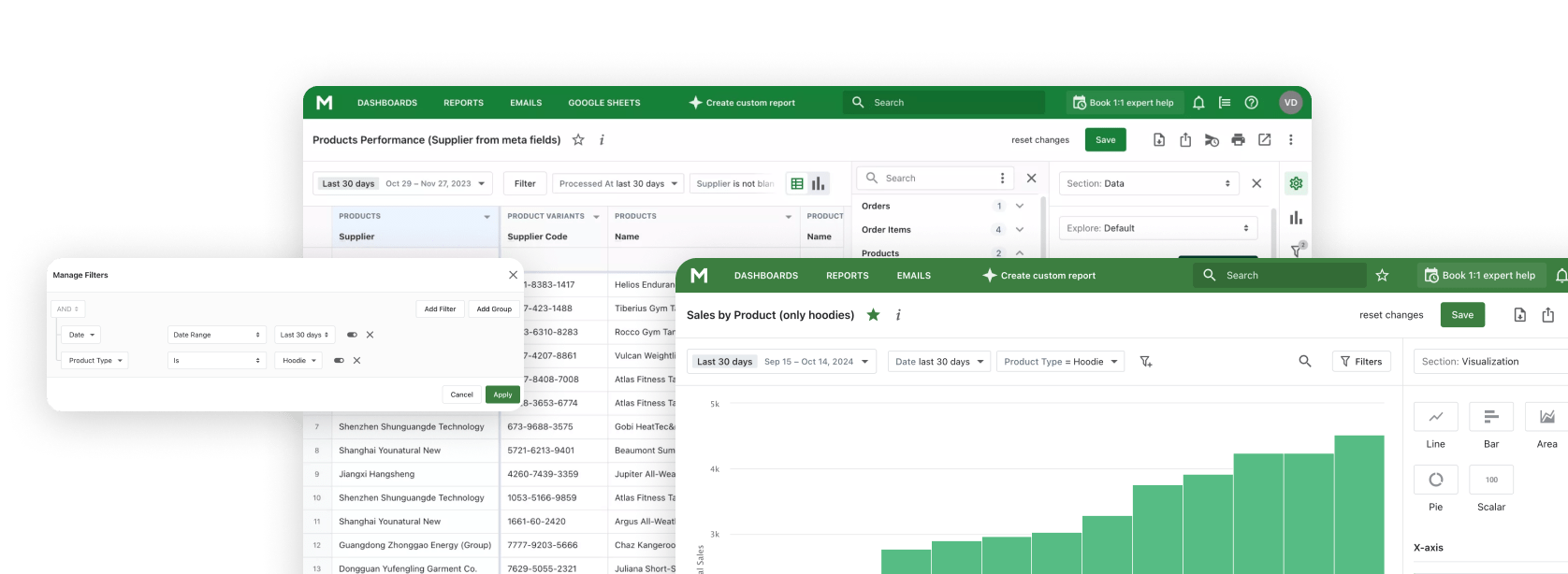
Connect AI tools like Claude, ChatGPT, and Gemini to Mipler Reports - your Shopify reporting and analytics platform.
Build reports, analyze trends, and get business insights through natural conversation using the Model Context Protocol.
Esportare costantemente dati da Shopify, copiarli in fogli di calcolo e poi incollarli negli strumenti AI. Un ciclo tedioso che spreca tempo prezioso.
Quando chiedi all'AI informazioni sulla tua attività, non ha accesso ai tuoi dati reali. Ottieni risposte generiche invece di insight specifici per il tuo negozio.
Passare dalla dashboard analitica alla chat AI ai fogli di calcolo interrompe il flusso e rende l'analisi inefficiente.
Collega Claude direttamente ai dati del tuo negozio Shopify tramite Mipler Reports. Nessuna esportazione, nessuna copia, nessun inserimento manuale dei dati.
Fai domande in linguaggio semplice e ottieni risposte dai tuoi dati reali. Nessun SQL, nessuna formula, solo conversazione.
Crea report, dashboard e analisi personalizzate semplicemente descrivendo ciò di cui hai bisogno. Claude li costruisce per te.
Crea report personalizzati attraverso la conversazione. Descrivi quali dati ti servono e Claude costruisce il report per te.
Progetta dashboard descrivendo cosa vuoi vedere. Claude organizza grafici, metriche e visualizzazioni.
Ottieni insight alimentati dall'AI dai dati del tuo negozio. Claude identifica tendenze, pattern e opportunità.
Esegui calcoli e formule personalizzate. Claude può eseguire espressioni per derivare nuove metriche dai tuoi dati.
Aggiungi colonne calcolate per migliorare i tuoi report. Claude può creare nuovi campi dati basati sui dati esistenti.
Fai domande in linguaggio semplice. Nessuna conoscenza tecnica richiesta per ottenere le risposte di cui hai bisogno.
Installa Mipler Reports dallo Shopify App Store e collegalo al tuo negozio. I tuoi dati si sincronizzano automaticamente.
Set up the Model Context Protocol in your preferred AI tool - Claude, ChatGPT, Gemini CLI, or any MCP-compatible client using the Mipler configuration.
Inizia a fare domande sui dati del tuo negozio, crea report e progetta dashboard attraverso una conversazione naturale.
"Show me today's sales"
"What are my top 10 selling products this month?"
"Create a report showing orders by country with average order value"
"Build a dashboard comparing this month vs last month sales, including total revenue, order count, and average order value "
"Analyze customer purchase patterns over the last 90 days: identify repeat buyers, calculate customer lifetime value, and find which products are most often bought together "
"Create a comprehensive monthly business review report:
- Revenue breakdown by product category, sales channel, and region
- Customer acquisition metrics: new vs returning customers, cost per acquisition
- Inventory health: slow-moving items, stockout risks, and reorder suggestions
- Top performing products and underperformers with trend analysis
- Recommendations for next month based on seasonal patterns and current data"
L'applicazione desktop ufficiale di Anthropic per macOS e Windows.
Usa Claude AI direttamente nel tuo browser su claude.ai.
Interfaccia a riga di comando per sviluppatori e flussi di lavoro da terminale.
OpenAI's ChatGPT with MCP support via plugins and integrations.
Google's Gemini command-line interface for terminal-based AI workflows.
MCP (Model Context Protocol) è uno standard aperto sviluppato da Anthropic che permette alle applicazioni AI come Claude di connettersi in modo sicuro a fonti di dati esterne. Permette a Claude di accedere e lavorare direttamente con i tuoi dati, senza dover copiare e incollare manualmente le informazioni.
Configurare Mipler Reports MCP richiede tre passaggi: Primo, installa Mipler Reports dallo Shopify App Store. Secondo, genera la tua configurazione MCP dalla dashboard di Mipler Reports. Terzo, aggiungi la configurazione al file delle impostazioni di Claude Desktop. Istruzioni dettagliate di configurazione sono fornite nell'app.
Tramite Mipler Reports MCP, Claude può accedere ai dati del tuo negozio Shopify inclusi ordini, prodotti, clienti, inventario e qualsiasi report personalizzato che hai creato in Mipler Reports. Claude può anche creare nuovi report, dashboard e colonne calcolate per tuo conto.
Sì. Le connessioni MCP sono autenticate e crittografate. Claude accede ai tuoi dati tramite l'API sicura di Mipler Reports, e le tue credenziali Shopify non vengono mai condivise direttamente con Claude. Controlli esattamente quali dati Claude può accedere tramite i permessi di Mipler Reports.
Non sono richieste conoscenze tecniche per usare Mipler Reports MCP una volta configurato. Interagisci con Claude usando il linguaggio naturale - basta fare domande o descrivere cosa vuoi costruire. La configurazione iniziale richiede di seguire semplici passaggi, ma non è coinvolta alcuna programmazione.
Mipler Reports MCP brings AI-powered analytics to your Shopify store through the Model Context Protocol. This open standard developed by Anthropic allows AI tools like Claude, ChatGPT, and Gemini to connect directly to your store data, enabling a seamless reporting and analytics experience without manual data exports or complex queries.
Traditional Shopify analytics often requires tedious workflows: exporting data, copying into spreadsheets, and pasting into AI tools. With Mipler Reports MCP, you eliminate this friction entirely. Your AI assistant has direct access to your orders, products, customers, and inventory data, delivering insights specific to your store rather than generic answers.
Through natural language queries, you can build custom reports, create dashboards, and analyze trends just by describing what you need. Ask questions like "What are my top selling products this month?" or "Create a report showing orders by country with average order value" and get instant results from your real Shopify data.
Mipler Reports MCP works with any application that supports the Model Context Protocol, including Claude Desktop, Claude Web, Claude Code CLI, ChatGPT with MCP plugins, and Gemini CLI. Setup is simple: install Mipler Reports from the Shopify App Store, generate your MCP configuration, and add it to your preferred AI tool.
Whether you need daily sales summaries, comprehensive inventory health reports, or customer acquisition analysis, Mipler Reports MCP transforms how you interact with your Shopify data. No SQL knowledge required, no formulas to learn — just natural conversation with AI that understands your business.
Unisciti a Mipler ora e beneficia di rapporti significativi oggi