Metafields Are Empty
If Metafield columns in Mipler appear empty despite having data in Shopify, it is likely that Metafield Synchronization is not enabled in your Mipler account settings. By default, Metafields are not synchronized in Mipler because not all clients require this resource, and enabling it can significantly impact server performance.
Steps to Resolve
-
Access the Settings Page
Navigate to the Settings page in your Mipler account. -
Locate the Synchronization Section
Scroll to the Metafields Synchronization section at the bottom of the page: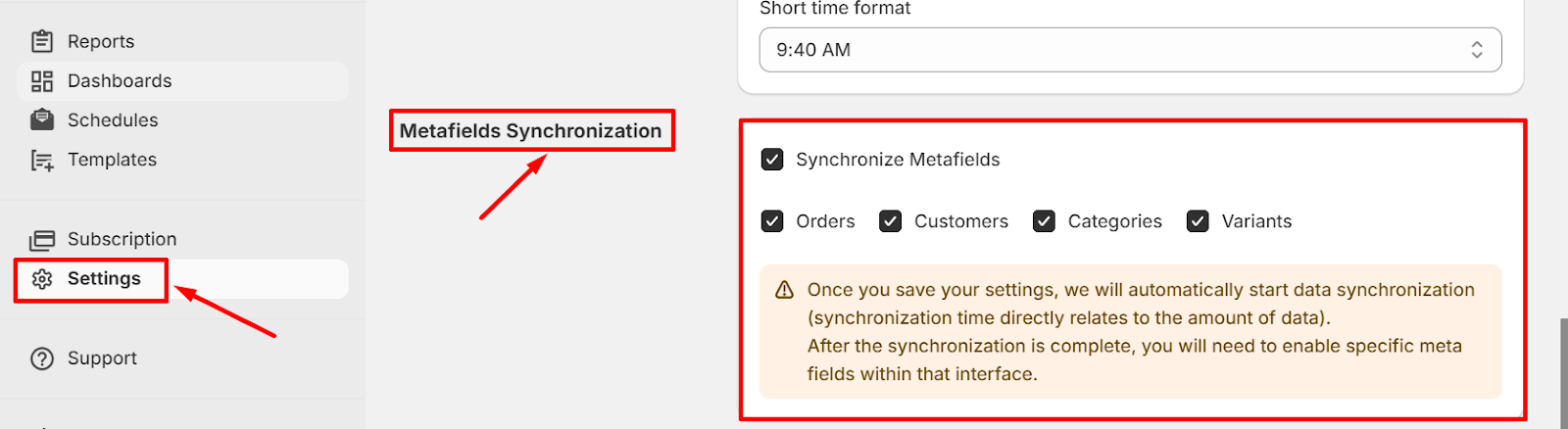
-
Enable Synchronization
Select the resources you need to synchronize, and enable them to start the process.
Important Notes
- Synchronization Time: The time required for synchronization depends directly on the volume of your data.
- Updated Reports: Once synchronization is enabled, Metafield data will be synced, and the previously empty columns in your reports should display the expected data.
- Columns added from a report: If you added the column through a report's column search, synchronization for that entity was already turned on for you, and the column simply stays empty until that sync finishes. See Metafield Columns.
If you have further questions or experience issues, contact Support through your Mipler account.